ReAI vs QuickBooks
A UK-focused guide to ReAI vs QuickBooks.
For UK businesses comparing ReAI vs QuickBooks, the decision is usually about how much structure you want around the bookkeeping process. QuickBooks is familiar to many small businesses and accountants. ReAI is aimed at teams that want more automation, clearer review steps and fewer manual handoffs as the accounts become more complex.
This comparison avoids short-lived promotional pricing claims and focuses on the workflow questions that keep mattering after the first month: control, automation, user access, reporting and the cost of extra admin.
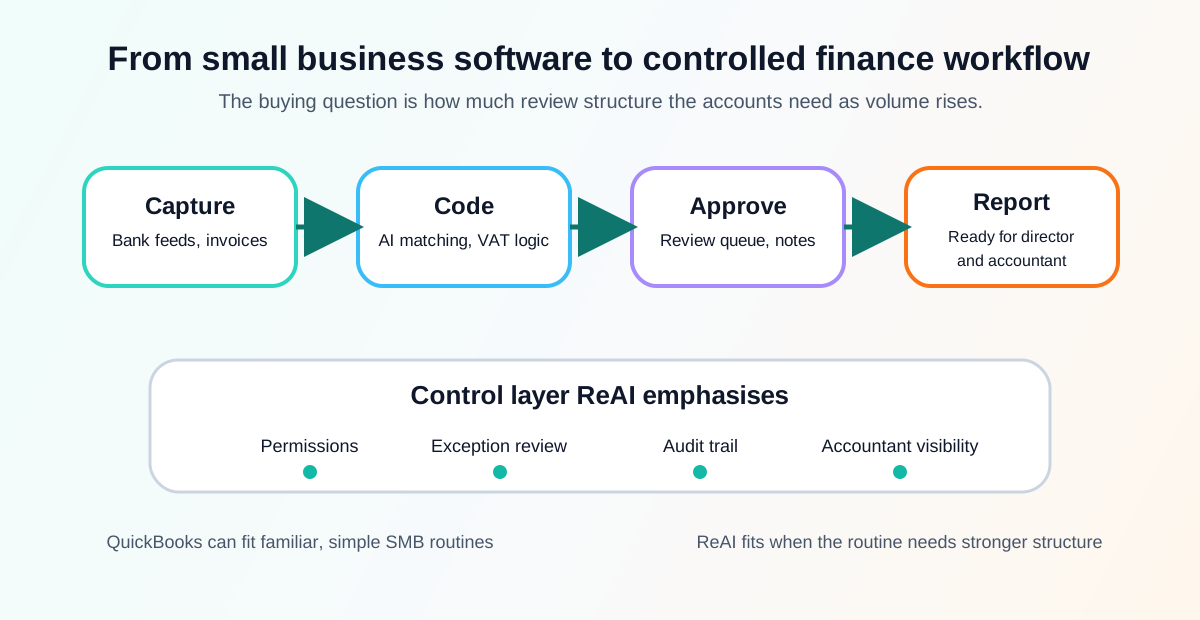
Quick comparison
| Area | ReAI | QuickBooks |
|---|---|---|
| Best for | UK businesses that want accounting automation with review discipline | Small businesses that want a familiar general accounting package |
| Workflow design | End-to-end accounting control in one platform | Broad SMB feature set with add-ons and configuration |
| Automation | AI-assisted posting, matching and exception checks | Helpful automation, rules and app extensions |
| Control style | Permissions, review points and audit trail are central to the process | Controls depend heavily on plan, setup and user discipline |
| Scaling question | Can the finance process grow without adding manual clean-up? | Can the existing QuickBooks setup stay tidy as volume rises? |
What changes in practice
Both systems can support invoices, bank feeds, VAT work and management reporting. The difference shows up when the business stops being a simple owner-managed file and starts needing repeatable controls.
| Situation | Why it matters | ReAI angle |
|---|---|---|
| More people touch the accounts | User permissions and approval routes become important | The workflow is designed around controlled review rather than open-ended editing |
| Bank transactions increase | Manual reconciliation becomes a recurring cost | Automation and exception review reduce the lines that need human attention |
| VAT returns need cleaner evidence | HMRC-facing records must be traceable | Coding, notes and review points sit closer to the accounting record |
| The accountant reviews periodically | Late clean-up can become expensive | A clearer audit trail helps the accountant see what happened earlier |
For the underlying control questions, read bookkeeping software permissions and accounting software audit trail .
Example: moving from simple admin to finance process
A small agency may start with one director raising invoices, reconciling bank lines and sending reports to the accountant at quarter end. QuickBooks can be a sensible fit for that stage because the tool is familiar and the workflow is easy to understand.
The same agency looks different after hiring staff, adding project costs, taking card payments and asking a bookkeeper to work in the file each week. Now the question is not only whether invoices can be raised. It is whether approvals, bank matching, VAT coding and reporting are controlled enough that the director can trust the numbers.
ReAI is positioned for that second stage. The aim is to keep the process manageable as volume rises, so the team spends more time reviewing exceptions and less time hunting through uncoded transactions.
Cost predictability
When comparing software cost, the monthly subscription is only one part of the decision. Also count:
- Time spent reconciling recurring bank transactions.
- Accountant time spent cleaning up miscoded entries.
- Extra tools needed for approvals, reporting, imports or payment workflows.
- Staff time spent checking whether the figures are ready for VAT, payroll or management accounts.
ReAI’s appeal is strongest when automation reduces those hidden costs. QuickBooks can still make sense where the existing setup is simple, the team is comfortable with the interface and the business does not need heavier review controls.
Use ReAI pricing for the ReAI side of the calculation, then compare the total monthly workflow cost rather than only the headline subscription.
Best fit
Choose ReAI when your priority is structured financial control, fewer manual steps and a clearer path from transaction capture to review. It is a better fit when bookkeeping volume is increasing or when a director wants a more reliable finance process without stitching together more tools.
Choose QuickBooks when your team wants a familiar SMB accounting product, your accountant already works happily in QuickBooks, or your business only needs a straightforward setup with limited review complexity.
Questions before switching
Before moving from QuickBooks to ReAI, check:
- Which bank feeds, card processors and payment routes need to be preserved?
- Which open invoices, bills, VAT periods and historic balances must be migrated?
- Which users need restricted access, approval rights or read-only accountant access?
- Which recurring journals, rules or templates are still useful?
- Which month-end checks should be rebuilt in the new workflow?
The data checks before switching accounting system guide gives a practical checklist before you import anything.
Next step
Read ReAI vs Xero if you are also considering a larger app ecosystem, or ReAI vs FreeAgent if you want to compare owner-managed simplicity with a more controlled finance workflow.