ReAI vs Xero
A practical UK comparison between ReAI and Xero.
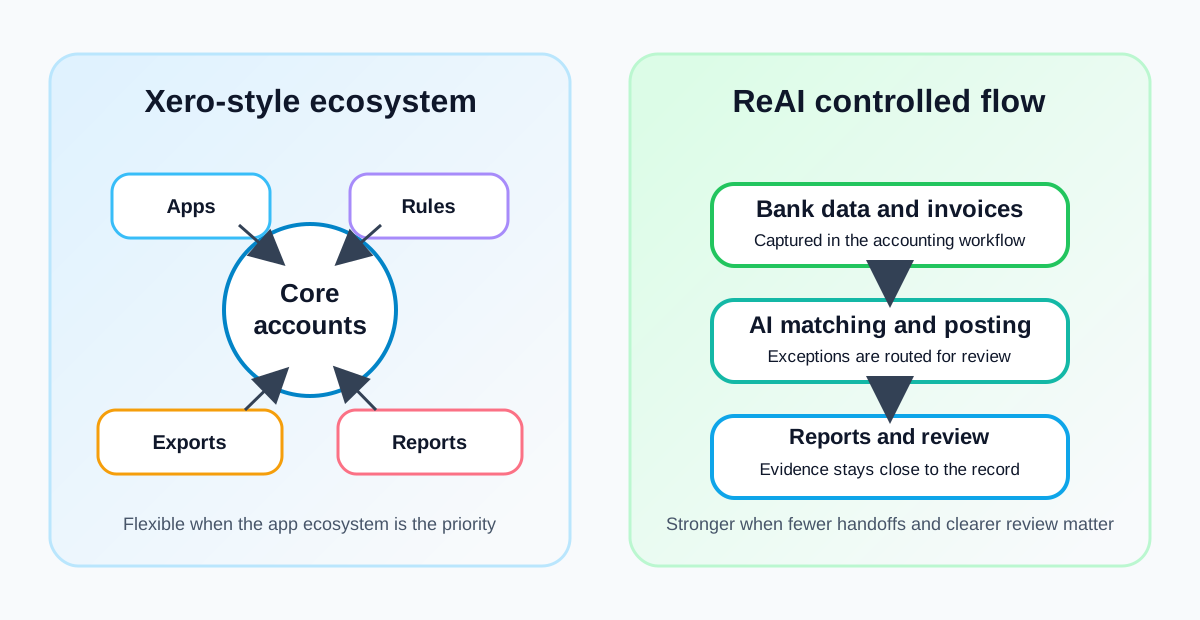
If you are comparing modern cloud accounting tools for a UK business, ReAI vs Xero is usually a question about operating style. Xero is a mature accounting platform with a broad app ecosystem. ReAI is built around a more controlled accounting workflow where bank data, posting, review and reporting sit closer together.
This page gives a practical summary for owners, finance leads and accountants who need a fast decision. For a feature-by-feature breakdown, use the detailed ReAI vs Xero comparison .
Quick comparison
| Area | ReAI | Xero |
|---|---|---|
| Best for | UK teams that want accounting automation and review control in one flow | UK teams that want a widely used platform with many third-party apps |
| Workflow model | Bank feeds, coding, review and reporting stay close together | Core accounting plus a large marketplace of connected tools |
| Automation focus | AI-assisted posting, matching and exception review | Bank rules, suggested matches and app-led automation |
| Control style | Built-in review points and cleaner handoffs | Flexible setup, but controls depend on configuration |
| Buying question | Do you want fewer manual steps inside one accounting workflow? | Do you need Xero’s ecosystem, advisor network or a specific app? |
The practical difference
Xero’s strength is breadth. If your business already runs on a set of apps that connect cleanly into Xero, the ecosystem can be valuable. You can shape the workflow around sector tools for e-commerce, expenses, project management, payments and reporting.
ReAI’s strength is depth inside the accounting process itself. It is designed so routine bookkeeping does not become a chain of exports, imports and manual checks. That matters when the pain is not “we need one more app”, but “we need the bank, invoices, VAT codes and review queue to line up every week”.
| Day-to-day task | What to ask when comparing |
|---|---|
| Bank reconciliation | Will the software only suggest matches, or will it reduce the number of transactions that need manual review? |
| VAT preparation | Are VAT codes reviewed as part of the bookkeeping flow before the return is submitted to HMRC? |
| Month-end checks | Can the team see unresolved exceptions, old suspense items and unusual postings in one place? |
| Accountant access | Can your accountant review the same evidence, notes and audit trail without rebuilding the file? |
If you are still defining what matters, start with the broader guide to choosing accounting software before comparing named vendors.
Example: a growing consultancy
Imagine a consultancy with two directors, recurring client invoices, several contractors, VAT registration and one part-time bookkeeper. In Xero, the team may connect apps for time tracking, expenses and reporting, then use rules and reconciliation suggestions to keep the ledger moving. That can work well if the apps are already embedded and someone owns the setup.
In ReAI, the same team would focus on a smaller number of controlled review steps: bank feed imported, invoice matched, VAT treatment checked, exception approved and reports ready. The difference is not whether the bookkeeping can be done. It is how much of the work depends on manual setup and how visible the review points are.
For a deeper control routine, compare your current process with bank feed automation controls and accounting software audit trail .
Best fit
Choose ReAI if your priority is a cleaner accounting flow, stronger review discipline and fewer handoffs between tools. It is especially relevant when transaction volume is rising, bookkeeping errors are taking too long to spot, or the finance process needs to be easier for a director and accountant to inspect.
Choose Xero if your business depends on a particular Xero-connected app, your accountant has a strong Xero-only process, or your team values marketplace breadth more than a tighter default workflow. Xero can still be the right fit when the ecosystem is the deciding factor.
Switching questions
Before moving from Xero to ReAI, check:
- Which bank accounts, payment providers and sales channels need to connect?
- Which users need access, and what should each person be allowed to change?
- Which reports does the business actually use every month?
- Which open invoices, bills, bank rules and VAT periods need to be migrated?
- What evidence will the accountant need for the next year-end file?
Use the guide to data checks before switching accounting system before importing balances or historical transactions.
Next step
Review ReAI pricing , compare ReAI vs QuickBooks and read ReAI vs FreeAgent if you are still shortlisting UK accounting software.